Home/What's new
Introducing

FlowSend 2.0

A new editor, attachments, translations and more

Our biggest update yet. We rebuilt the way you create emails in FlowSend: three editors, a bigger template Library, template attachments, translations, a better preview, a Storage tab and AI access over MCP. Here are the 8 updates, and where to find each one.

1 of 8New

Three ways to build an email

There used to be two modes, Visual layout and HTML. Now you choose between a free-form Rich editor, a block-based Visual editor, and an HTML editor with formatting, commands and issue checks.

Find itEmail TemplatesCreate templateEditor mode

How it works: Three ways to build an email →
2 of 8New

Rich editor: design on a free canvas

Click or drag text, images, logos and buttons anywhere, pull in products from your store, and save a section as a synced block so one edit updates every template that uses it. It exports as email-safe, responsive HTML.

Find itOpen a templateSettingsRich editor

How it works: Rich editor: design on a free canvas →
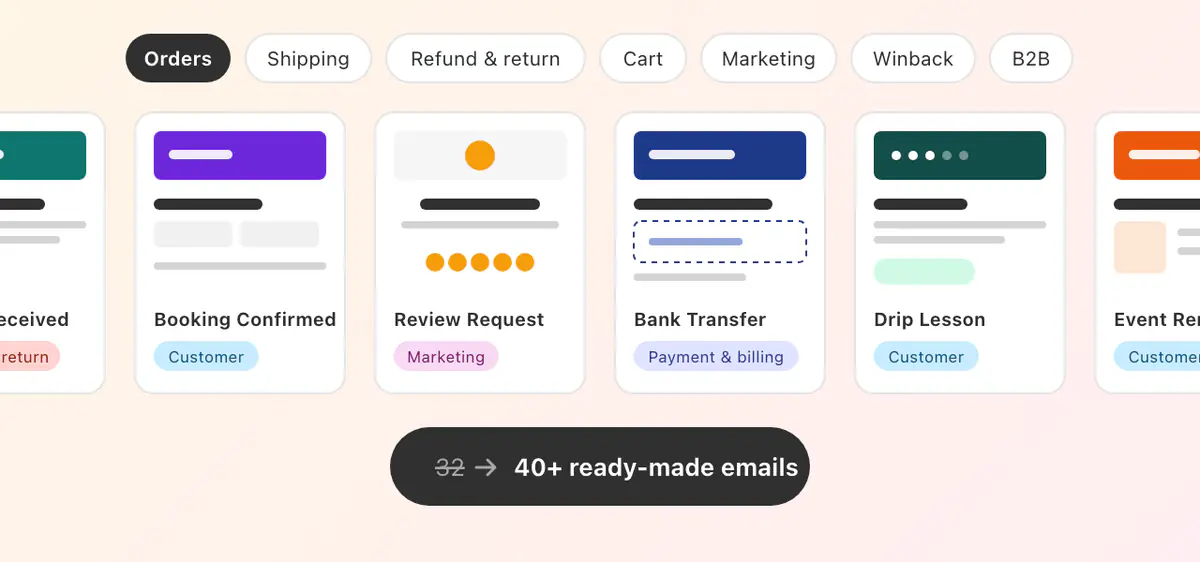
A row of ready-made email templates; the library grew from 32 to more than 40
3 of 8Improved

A bigger Library: 40+ ready-made emails

Start from a designed, tested email instead of a blank editor. The Library has grown from 32 templates to more than 40, and template cards now show a larger preview, the editor type and when each was last updated.

Find itEmail TemplatesLibrary

How it works: A bigger Library: 40+ ready-made emails →
4 of 8New

Attach files to any template

Upload files or add them from a link, up to 10 files, 15 MB each and 20 MB per email. They go out with every Flow action and test email that uses the template, alongside any files the Flow step adds.

Find itOpen a templateAttachments

How it works: Attach files to any template →
5 of 8New

Send each email in your customer's language

Turn on Translations, add the languages your customers use and translate each block. Customers whose language has no translation get the original, and you can preview any language before sending.

Find itOpen a templateSettingsTranslations

How it works: Send each email in your customer's language →
6 of 8Improved

A preview that's closer to the real inbox

Check your email on desktop, mobile and in dark mode, switch the sample data and language it renders with, and see how the subject and preheader look in the inbox. Checks flag anything to review before you activate.

Find itOpen a templatePreview

How it works: A preview that's closer to the real inbox →
7 of 8New

See your file storage, and clean it up

A new Storage tab shows how much of your plan's storage is used by email images, editor images and Flow attachments, lists every stored file with where it's used, and lets you delete unused files in one click.

Find itSettingsStorage

How it works: See your file storage, and clean it up →
8 of 8Improved

Connect your AI assistant over MCP

AI access now lives in Settings. Connect ChatGPT, Claude, Gemini or any assistant that supports MCP with one server URL, see how many connections your plan allows for each, and review what every assistant did under History.

Find itSettingsAI access

Works withChatGPTClaudeGeminiModel Context Protocol
How it works: Connect your AI assistant over MCP →

Try FlowSend 2.0 on your next email

Open Email Templates, create a template and choose the Rich editor. Already installed? The update is live in your store, with nothing to reinstall.

Try FlowSend 2.0

Questions? Contact the Final Apps team and we will help.

Flow triggers it.
FlowSend sends it.

Send your first branded email from Shopify Flow today.

$1 first month · 500 free lifetime actions · 30‑day money‑back